HOME MADE LABELS AND STICKERS
WITH KARINE


How long do you scrap?
I call that scrap since the birth of my daughter, before I fiddled with my pictures, without knowing that there existed really a style.
I started by discovering a Scrap magazine, then I entered as a member of Asso-ScrapLandes. Through exchanges of materials, techniques, know-how, but also workshops-meetings and especially with all the girls who take part in it, I have enriched my discoveries.
Thus, I discovered the dedicated to scrapbooking forums , challenges, Kits and Scrapbooking-shops, and more. I sometimes spend more time on the web on my Scrap desk.
What do you prefer to Scrap?
Contrary to what people will think I am not attracted by Digital Scrap and yet my job is that I am at ease in editing photos ...
Visual artist by education, I need to touch matter, to give relief, to highlight my photos. In addition, I love digging, antiquing, diverting objects from their original meaning.
I love painting, but can not put paint in my scrapbooking, or very rarely ... In fact, what I like is to start from my picture, to take my paper trims, to take anything lying around and to assemble the whole together.
What are your favorite colors?
I like blue and brown .... I often find myself facing a major problem ....I never buy orange color... And yet I find this color superb on certain pages.
In fact it's textured look , printed papers that influence me most. I can not say: "Today, I need this color for this project ... The color that I exhaust the faster is red .... I always put some keys of that color...
What brings you scrap?
Friends (and real ! Among girls of the association, meetings at the Crop), Creativity (what i like most), Passion, Smiles whenever I see my scrap table overflowing with non-completed projects . In Short only happiness!
VISIT THE KARINE'S BLOG :
And her marvellous label and papers collection...

(click to see)
You say Embellishments Labels?
I know what you're going to tell me ... I can not draw ... I have no ideas ... Never mind! Here are some tips for making your own labels.
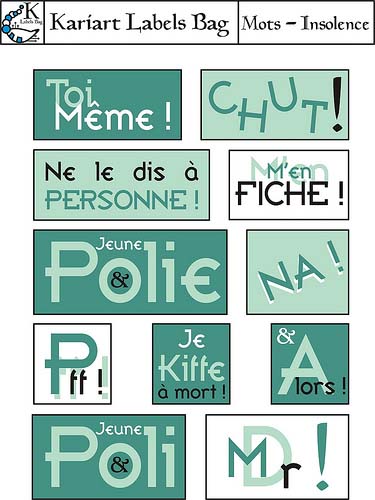
You can start from your pictures, or a theme, a publicity or magazine articles titles, everything is inspiration.
No need to write 3 tons of texts, sometimes with only a word that is all. Think simplicity.
With Microsoft Word ... simply!
To achieve labels, several solutions are available to you ... I propose an affordable solution to anyone having this machine of torture we give the sweetname of PC.
Then a software such as Word can be enough .... Of course for the professionnals, there are other more suitable softwares such Photoshop, Corel Draw, Illustrator .... But, here I prefer to keep things simple ...
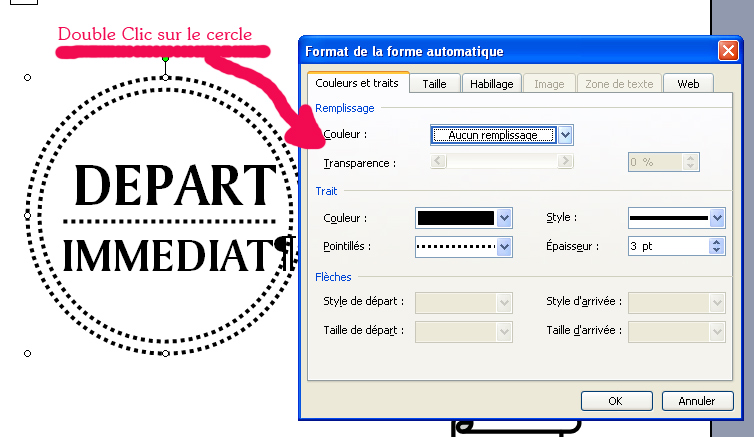
So you open a new document with Word, then take the "text box" tool With it, you draw a rectangle.
You get a blank rectangle with a border. This border may be a more or less thick border, but also a dotted one : it is sufficient to alter the properties.
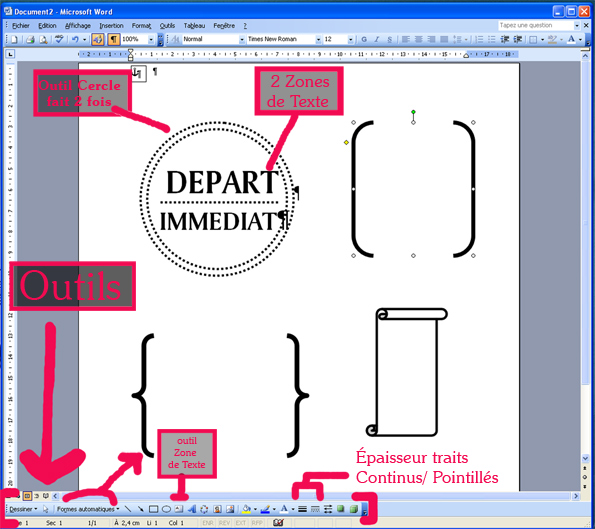
In this rectangle, you write your text by adjusting the color, size of letters, fonts (downloadable for free on www.dafont.com), and their position.
You can superimpose the text boxes as in the example "Mutine & Romantic" : the first text box for 2 texts, a second box for "&"

Vary the shapes !
You can draw rounds, rectangles, to wichyou can allot an edging (full lines or dotted lines, various thickness).
.jpg)
Then you take the lines tool, which can have at its ends of the arrows, of the rounds….
There exist “automatic forms”, are used for of to be made labels with brackets or hooks, it's the latest fashion...
By Double-clicking on the obtained shapes, you open a window. It enables you to change the filling (with or without coulour), the edges (full/dotted line, thickness, color), the Arrows especially for the features.
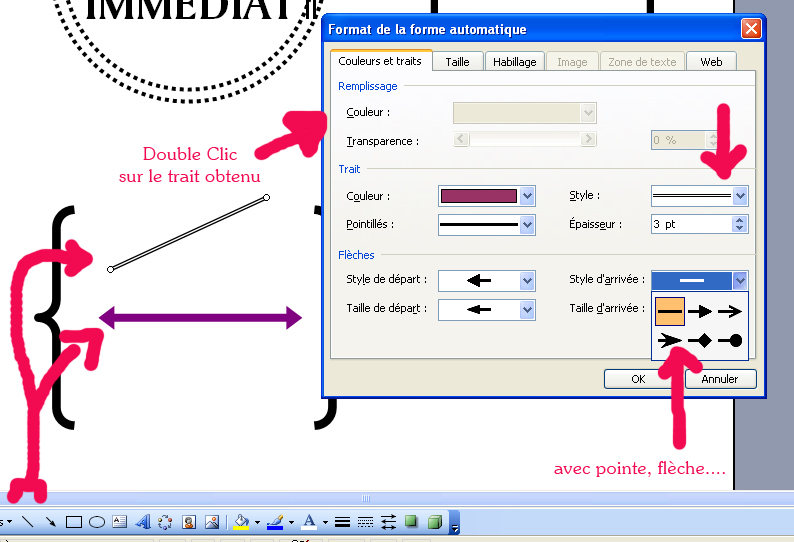
Launch you !
With the various examples and the tutorials in image, I think that you can now launch you in the adventure of the labels house… Be on the look out on my site...
Small trick: You can print your labels on thick supports, papers of beige color, Scrap papers with textured bottoms, that will give another appearance to your labels.
Regarding my labels, I make small doodles during I look at the TV, or in the waiting rooms. I scan, vectorized and redraw then with publishing softwares…. I find it more difficult to explain. But if you need advice, feel free to ask me I will answer you without any problem.
.
French General
Labels & Stickers
Kaari Meng (Author)
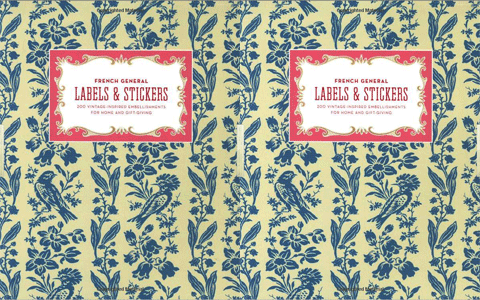
(click to enlarge)
... Filled with 200 multipurpose stickers and labels this petite portfolio offers an elegant way to personalize homemade treats and crafts sweeten home organizing or add a missive to gifts and correspondence...